Translate the BestSync User Interface into Your Native Language
BestSync provides language patches for the following languages:
NOTE: The following language patches are for BestSync 2026 and later versions.
| Language | Resource File (For translation) |
User Interface Patch DLL (32Bit) |
User Interface Patch DLL (64Bit) |
|---|---|---|---|
English   
|
English resource file | Included in the installer | Included in the installer |
Portuguese 
|
Rc_0416.zip | Brazilian Patch | Brazilian Patch |
Chinese (Simplified)
|
Rc_0804.zip | Included in the installer | Included in the installer |
| Chinese (Traditional)  
|
Rc_0404.zip | Included in the installer | Included in the installer |
Czech
|
rc_0405.zip | Czech Patch | Czech Patch |
Denmark
|
Rc_0406.zip | Included in the installer | Included in the installer |
Dutch (Netherlands)
|
Rc_0413.zip | Included in the installer | Included in the installer |
French
|
Rc_040c.zip | Included in the installer | Included in the installer |
German
|
Rc_0407.zip | Included in the installer | Included in the installer |
Greek
|
Rc_0408.zip | Greek Patch | Greek Patch |
Italian
|
Rc_0410.zip | Italian Patch | Italian Patch |
Japanese
|
Rc_0411.zip | Included in the installer | Included in the installer |
Polish
|
Rc_0415.zip | Polish Patch | Polish Patch |
Russian
|
Rc_0419.zip | Russian Patch | Russian Patch |
Slovak
|
rc_041b.zip | Slovak Patch | Slovak Patch |
Spanish (Chile) 
|
rc_340a.zip | Spanish (Chile) Patch | Spanish (Chile) Patch |
Swedish
|
rc_041d.zip | Swedish Patch | Swedish Patch |
| Swedish (Alternative Translation)
|
rc_041d1.zip | Swedish Patch (Alternative) | Swedish Patch (Alternative) |
Turkish
|
rc_041f.zip | Turkish Patch | Turkish Patch |
Ukrainian
|
rc_0422.zip | Ukrainian Patch | Ukrainian Patch |
| Language | Resource File (For translation) |
User Interface Patch DLL (32Bit) |
User Interface Patch DLL (64Bit) |
How to Apply the Language Patch:
- Download the language patch DLL (BestSyncApp.XXXX) to the install folder of BestSync.
- Select the [Option/Language] menu to switch the language of the user interface.
Get a Free Ultimate License by Translating the BestSync UI into Your Native Language:
Please follow these steps:
1.Download the English resource script fileor resource script of other languages.
2. Decompress the downloaded file, open the MyAppEng.rc with notepad.exe,
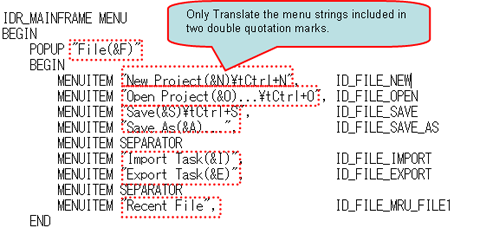
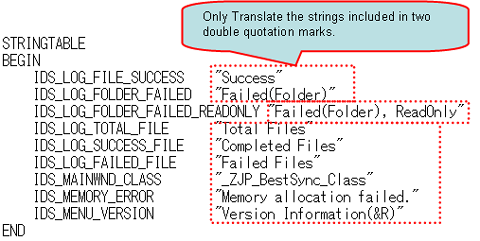
and translate the English strings in the resource file to your native language.
Translate the menu string:
3. Send the translated resource file BestSyncXXX.rc back torisefly@risefly.com, and tell us the
name of your native language and send us the bitmap of the national flag.
4. We'll compile the resource script file into the language patch file, and
send the language patch file to you. Your fellow citizens can then download the
language patch file.
5. We'll provide you with the Ultimate License of BestSync for free.

