BestSync Q&A
How can I synchronize with my FTP server on the Internet?
BestSync supports direct synchronization with an FTP server.
For the setup steps, please refer to this tutorial document.
I can connect to the FTP server without any issues using Windows Explorer, but BestSync can't. Why?
Since FTP needs to communicate with the FTP server over the network, you may need to adjust the settings of your Windows Firewall or the firewall settings of your antivirus software. Please add BestSyncApp.exe and BestSyncSvc.exe to the exception list of your Windows Firewall or antivirus software.
If the problem persists, try using the "Passive" mode to connect to the FTP server.
If the problem still persists, start the Preview of the task and look at the FTP response window to see what error occurs when connecting to the FTP server.
How do I configure the firewall settings for FTP transfer?
- Add BestSyncApp.exe and BestSyncSvc.exe to the allowed list of the firewall.
- Add Port 21 or 990 (FTPS according to the server settings) to the exception list of the firewall.
On the FTP server side, select the transfer mode (Passive or Active). Passive mode is recommended.
If Passive Mode is used:
- On the FTP server side, set the port range used for the data channel.
- Add this port range to the allowed receiving port list of the firewall on the FTP server.
- Add this port range to the allowed sending port list of the firewall on the client (where BestSync is installed).
If Active Mode is used:
- Set the port range in "Option"/"Active Mode" of BestSync.
- Add this port range to the allowed sending port list of the firewall on the FTP server.
- Add this port range to the allowed receiving port list of the firewall on the client (where BestSync is installed).
Why is it so slow when scanning changed files on the FTP server?
The speed issue may be due to the following two reasons:
1. The firewall settings are not correct.
The FTP protocol uses a different TCP port for each data transfer. If the TCP port is not allowed by the firewall, the transfer may be blocked, and it will not end until a long timeout occurs.
If this is the case, please correctly set the firewall settings as described above.
2. The FTP server does not support the MLSD command.
If the FTP server does not support the MLSD command, which can list files on the FTP server with accurate timestamps, BestSync needs to call the MFMT, MDTM or UTIME command once for each file to get its accurate timestamp during the first scan. This action takes a long time if the FTP folder contains many files. However, from the second synchronization onwards, BestSync uses a timestamp database to extract the different timestamp from the last time, reducing the calling times of the MFMT, MDTM or UTIME command, which can significantly reduce the synchronization time.
To decrease the synchronization time, you need to select an FTP server that supports the MLSD command, such as FileZilla.
Why does BestSync ignore the changed files?
BestSync compares the file name and file time in two-way sync. If in one-way sync and "Mirror" mode in the "Delete" page is selected, BestSync also compares the file size. If the sync task is synchronizing with an FTP server, and the FTP server does not support setting file time command (one of MDTM, MFMT, UTIME) and getting accurate file time command (one of MLSD, MDTM), the time difference between files must be more than 180 seconds, otherwise BestSync will ignore the change. If the FTP supports these commands, the time difference must be more than 120 seconds (BestSync 2015 and earlier), or 90 seconds (BestSync 2015 and later).
How can I compress a folder to a ZIP file and upload the ZIP file to an FTP server automatically?
You can accomplish this task by setting up two tasks.
Task1: FolderA==>FolderB\ZIP file, and specify a schedule to run this task automatically, such as every 10 minutes.
Task2: FolderB (including the ZIP file)==>FTP Folder), Set up Task2 to run after Task1 using the "Application" setting of Task1.
How can I get the FTP command and response log file?
Please follow these steps:
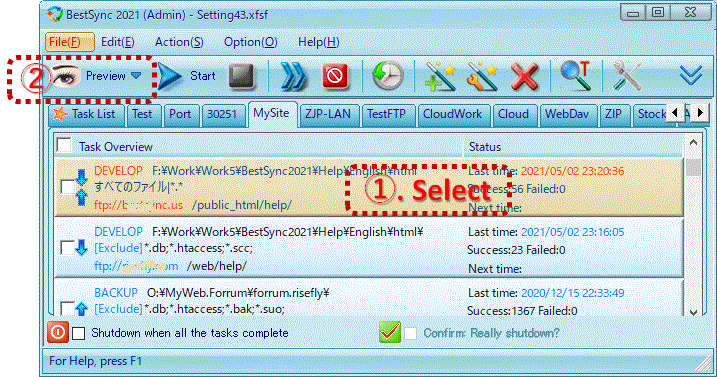
1. Select the FTP task in the task list by clicking the task item in the task list.
2. Start the Preview of the task by clicking the "Preview" button on the toolbar.
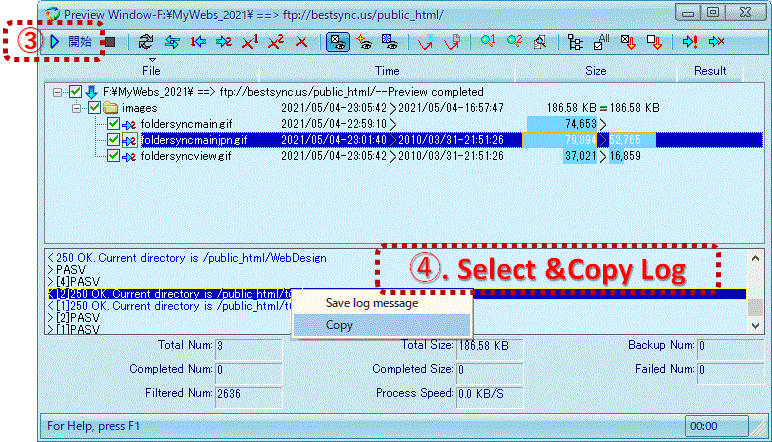
3. In the Preview Window, after the file scanning, click the "Start" button on the toolbar.
4. Right-click on the FTP Log Window, click the "Save log message" menu to save the FTP command and Log to a file.